Pallini: The Lightweight Display Font with a Classic Digital Vibe
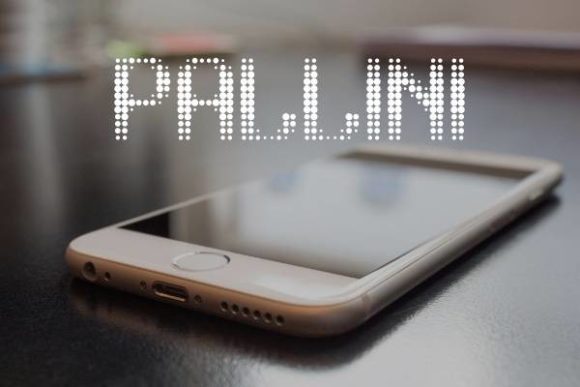
There’s a certain charm in a typeface that doesn’t try too hard. It doesn’t shout for attention with overly complex swashes or dramatic flair. Instead, it sits confidently in its simplicity, offering clarity and a quiet sophistication. That’s the immediate impression Pallini makes. Created by Rikyozone, this display font is built on a foundation of clean lines and a light weight, yet it carries a distinct personality that feels both retro and forward-thinking. It’s the kind of font that can anchor a design without overwhelming it, making it a surprisingly versatile tool in a creator’s kit.
Understanding Pallini's Visual Character
At first glance, Pallini might remind you of the early digital era—the clean, geometric forms of early computer interfaces or the minimalist typography of 1990s tech branding. But it avoids feeling dated. The letterforms have a balanced, open quality that promotes excellent readability, even at smaller sizes. The light weight is a key feature; it prevents the text from becoming too heavy or imposing on a page, which is perfect for designs that need to feel airy, modern, and approachable. This isn’t a serif font loaded with traditional authority, nor is it a stark, cold sans-serif. It occupies a sweet spot: a display typeface with enough character to be interesting, but enough restraint to be functional across numerous contexts.
Where Pallini Truly Shines: Practical Applications
The real test of any typeface is how it performs in the wild. Pallini’s clean aesthetic and digital-native feel make it a strong candidate for a wide array of projects, especially those aiming for a contemporary, professional look with a touch of personality.
- Brand Identity & Logo Design: For startups, tech companies, or any brand wanting to project clarity and modernity, Pallini can form the core of a visual identity. Its legibility at various scales makes it suitable for everything from app icons to website headers. Think of a boutique software company or a clean beauty brand—the font supports a message of simplicity and effectiveness.
- Digital & Social Media Graphics: On platforms where attention spans are short, a font that communicates quickly is invaluable. Pallini works beautifully for Instagram stories, LinkedIn banners, and Pinterest pins. Its light weight ensures text overlays on images remain clear without creating visual clutter, helping maintain a consistent and professional feed aesthetic.
- Packaging & Merchandise: In packaging design, typography must be both attractive and functional. Pallini’s classic digital appearance can give product labels, especially for tech accessories, gourmet goods, or artisanal products, a clean, trustworthy feel. It also translates well to merchandise like tote bags or minimalist apparel, where a subtle, stylish font is preferred over something overly bold.
- Web & Editorial Design: For blogs, online magazines, or digital product interfaces, Pallini can be used for headings, pull quotes, or navigation elements. It pairs intriguingly with a simple, neutral body copy font, creating a visual hierarchy that guides the reader’s eye. Its readability on screens is a significant advantage for any web-based project.
- Print Materials & Invitations: Don’t limit it to digital. For event posters, business cards, or wedding invitations seeking a modern twist, Pallini offers a fresh alternative to overused script or decorative fonts. Its clarity ensures important details like dates and addresses are easily communicated.
Making the Most of Pallini: Pairing and Practical Tips
Choosing a font is just the first step. Using it effectively is where the real design work happens. Here’s how to integrate Pallini into your projects thoughtfully.
Consider the Project’s Core Message. What feeling should your design evoke? Pallini leans toward modern, clean, and slightly technical. If your project is deeply traditional, whimsical, or ultra-luxurious, it might not be the perfect fit. Always match the font’s personality to the project’s goals.
Master the Art of Font Pairing. A display font like Pallini often works best when paired with a more neutral companion for body text. Try combining it with a straightforward sans-serif like Open Sans or Lato for a cohesive, modern look. For a touch of contrast, a classic serif like Merriweather or Playfair Display used in smaller doses can create visual interest. The key is to let Pallini handle the headlines or key phrases where its character can shine without competing for attention in long paragraphs.
Test for Readability in Context. Always view your chosen font in the actual environment it will be used. Set a headline in Pallini on a mockup of your website or social media post. Print a sample of your brochure or business card. Does it remain clear at the size you intend? The light weight is elegant, but ensure it has enough contrast against its background, especially in digital contexts where screen glare can be an issue.
Explore the Included Styles. While the core description highlights its light weight, check the full font package from Rikyozone. Often, typefaces come with a family of weights or styles (like italic or bold). Understanding the full range gives you more tools for creating hierarchy and emphasis within your designs without needing to introduce a second, potentially clashing, typeface.
Clarify Commercial Licensing. If you’re using Pallini for client work, merchandise for sale, or any commercial project, this is non-negotiable. Always review the license provided by the creator. Most premium fonts, including those found on reputable marketplaces, have specific terms for commercial use. Ensure your license covers your intended application to avoid legal issues down the line. This due diligence is a fundamental part of professional design work.
A Thoughtful Addition to Your Design Toolkit
In a landscape saturated with expressive scripts and high-contrast serifs, Pallini offers a refreshing alternative. It doesn’t demand the spotlight but earns its place through consistent performance and adaptable style. It’s a typeface that understands the balance between aesthetic appeal and practical application, making it a worthy consideration for your next branding project, social media campaign, or product launch. By focusing on clarity, modernity, and a touch of digital nostalgia, it provides a solid foundation for designs that aim to communicate effectively and look effortlessly professional.